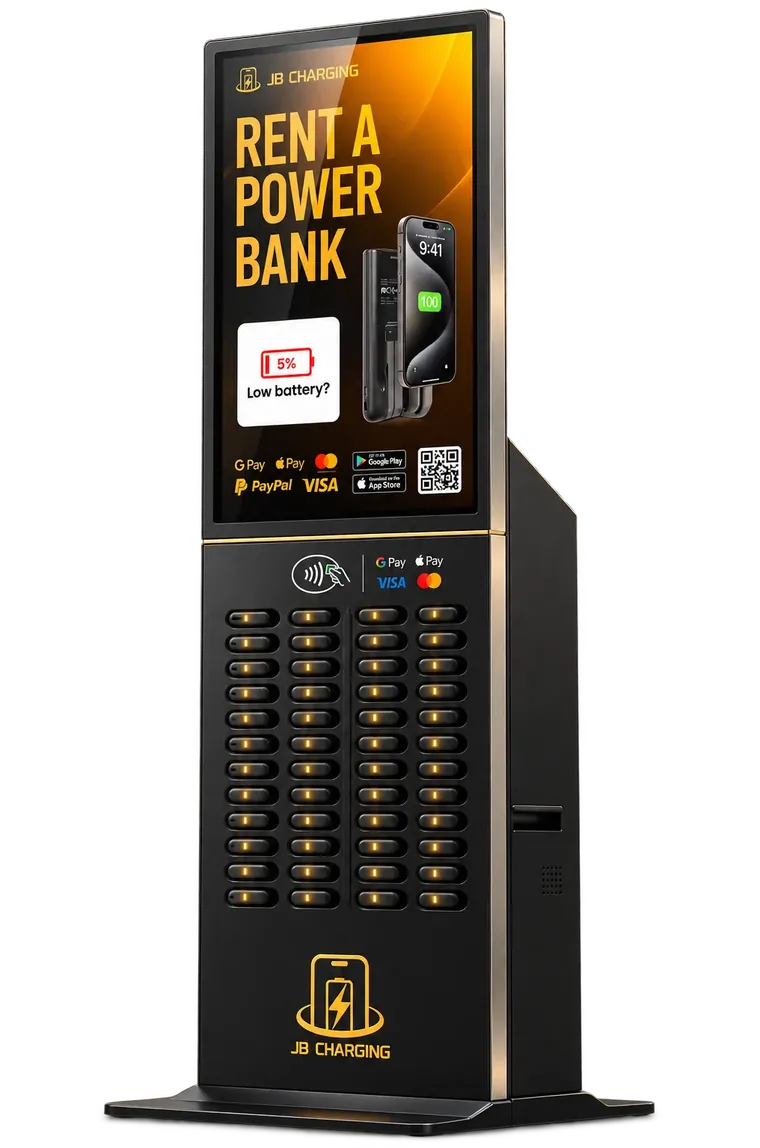
A moment of attention
Guests walk up on purpose and stand at eye level with the screen to rent, then again to return.
Advertise
Plans and pricingVenue, cluster, region or event How it worksBrief to on-screen in five steps Media kitEnvironments, formats, specs Add-ons and wrapsDesign, changes, station wraps Spotlights NewSample case studies with charts What you'd see NewSample results dashboardBy venue type
By region · Southern California
Creative
On location NewYour ad on 15 venue screens Screen specs1080 × 1920 and 1280 × 800 Sample gallerySample loops on station screens Design tipsOne headline, one offer, one action Station wrapsYour brand on the station bodyAt a glance
Station screen ad network · Live in Southern California · National rollout launching
Your 15-second spot on JB Charging station screens, inside the bars, hotels, stadiums, gyms and events where guests stop to rent and return a power bank. They stand right in front of your brand.
Preview loop runs at 3× speed. Live spots run 15 seconds.
Background: AI-generated scene, sample ad
01Why it works
Guests walk up on purpose, tap to pay, take a power bank and come back to return it. The screen is right in front of them each time.
Guests walk up on purpose and stand at eye level with the screen to rent, then again to return.
Stations go where people stay a while: hospitality, sports, nightlife, healthcare, fitness and events.
A local crew installs, restocks and services every station, so the screen and the rental keep working.
Every ad is reviewed against each venue's category rules, and a proof is approved before anything runs.

Live momentConcerts · festivals · events
Phones are the ticket. Your brand is the stop.
Entry, cashless payments, meetups and the ride home all need battery. Event takeovers put one brand on every screen and wrap on site.
Plan an event takeoverAI-generated scene, sample ad · fictional brand
02Venue environments
Match the venue to the message. Choose by venue type, by area, or both. We confirm the exact screens in each proposal.
J48 ProStation anatomy
The J48 Pro carries the largest screen in the lineup. Six details decide how your 15-second spot is seen. Tap a number to look closer.
03Formats and specs
A 15-second spot in the station loop: static, animated or muted video, with a QR code to your offer.
Full-color vinyl on the station body, laid out for each model. Seen from across the room.
Your brand on the station and on the screen, so one campaign owns the moment. Ideal for launches and sponsorships.
04Plans
Every plan runs your ad in a shared loop on the screens you choose. Draft pricing, confirm before publishing.
07Coverage
Run in one neighborhood or across several regions. Station locations grow as new venues join, so we confirm the exact screens in each proposal.
08Questions
Still deciding? Call 1-844-FULLBAR or send a brief below.
AdvertisePlans and pricing
Every plan runs your ad in a shared loop on the station screens you choose. Plans differ by how many venues you cover and how often you can change your artwork.
Your spot in the loop
Shared plans rotate your ad with a handful of other local businesses, up to eight per loop, between the station's own rental prompts. Event Takeover gives you every screen, every spot, for the day.
How it works
You tell us who you want to reach. We find the screens, prepare your ad, and send you a proof. Nothing runs until you approve it.
Add-ons
Draft pricing, confirm before publishing. Prices exclude any applicable taxes.
Station wraps
A full-color vinyl wrap on the station body, designed to fit the model's panels. Pair it with any plan, so your brand shows on the station and on the screen.
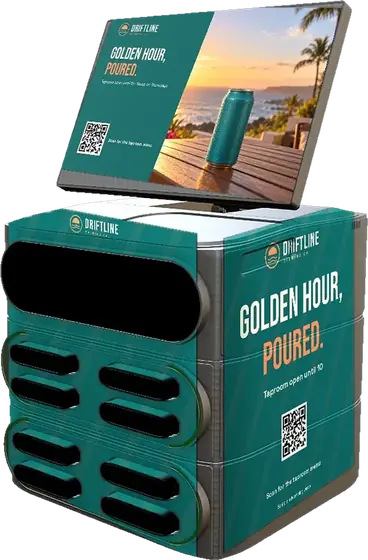
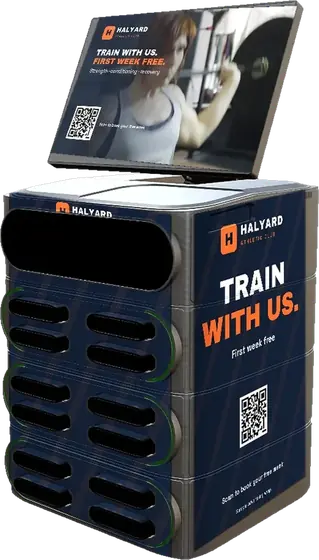
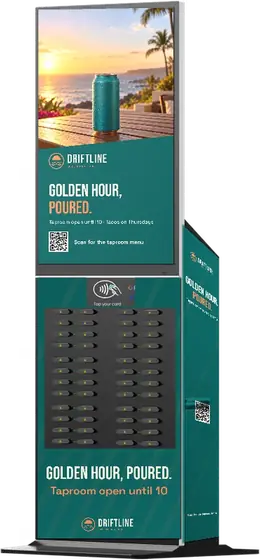
Sample illustrations with fictional businesses.
Questions
Where it runsVenues and regions
Stations are placed in venues where people stay a while and need their phones. Choose by venue type, by area, or both.
ExploreBy venue type
By areaSouthern California
Run in one neighborhood or across several regions. We confirm the available screens in your proposal.
Campaign builderDraft pricing, confirm
Choose a plan, where to run and for how long. The draft estimate uses the published plan prices; your proposal confirms venues, screens and the final price.
Ad studioYour ad, previewed
Build one design and see it natively on a tall 1080 × 1920 station screen and a 1280 × 800 countertop screen at the same time. Everything stays in your browser.
Template
Words
Color
Logo and QR
Preview
Design tipsFrom the ad design guide
Guests are mid-task when they reach a station: tapping to pay, grabbing a power bank, heading back to their table. Give your ad one job.
A short, bold line that reads from a few steps away. A reason to act now. Scan the QR code, visit the bar, download the app. If it needs a paragraph, split it into two campaigns.
Design portrait and landscape natively instead of cropping one file. Keep text and logos 5% in from every edge, and leave the bottom 4% clear for the loop progress bar.
At least 15% of the screen width, dark on a light background, with a short call to action beside it. Send it to a fast mobile page about the offer, with a campaign-specific link.
Screens play muted. Show the brand and offer in the first seconds, put spoken lines on screen as text, and avoid rapid flashing. MP4 (H.264), up to 15 seconds.
Stadiums: big type and team energy. Festivals: bright and simple. Hotels: calm and premium. Bars: an offer for tonight. Gyms: performance and routine.
Use the template for each station model, keep the screen and return slots clear, and put your logo and offer near eye level so the station reads as one campaign.
CreativeSample gallery
Ads rotate with the station's own rental message. Each shared spot plays in turn, all day. Swipe through sample loops on tall and countertop screens.
Sample ads for fictional businesses. Motion is simulated for this preview; live spots run 15 seconds.
Sample campaignsScreen + wrap
Pair a full-body wrap with your screen ad and every guest who stops to charge sees one brand. All brands shown are fictional samples.
Media kitJB Charge Ads
JB Charging stations sit inside bars, hotels, stadiums, hospitals, gyms, casinos and events. Every guest who rents or returns a power bank stands in front of the screen. Your brand can be on it, or wrapped around it.
01Why it works
Guests walk up on purpose, tap to pay, take a power bank and come back to return it. The screen is right in front of them each time.
Hospitality, sports, nightlife, healthcare, fitness and events across six SoCal regions.
A local crew installs, restocks and services every station, so the screen and the rental keep working.
Every ad is reviewed against venue category rules. A proof is approved before anything runs.
02Venue environments
Illustrative AI-generated scenes. Advertiser brands shown are fictional samples.
03Screen lineup
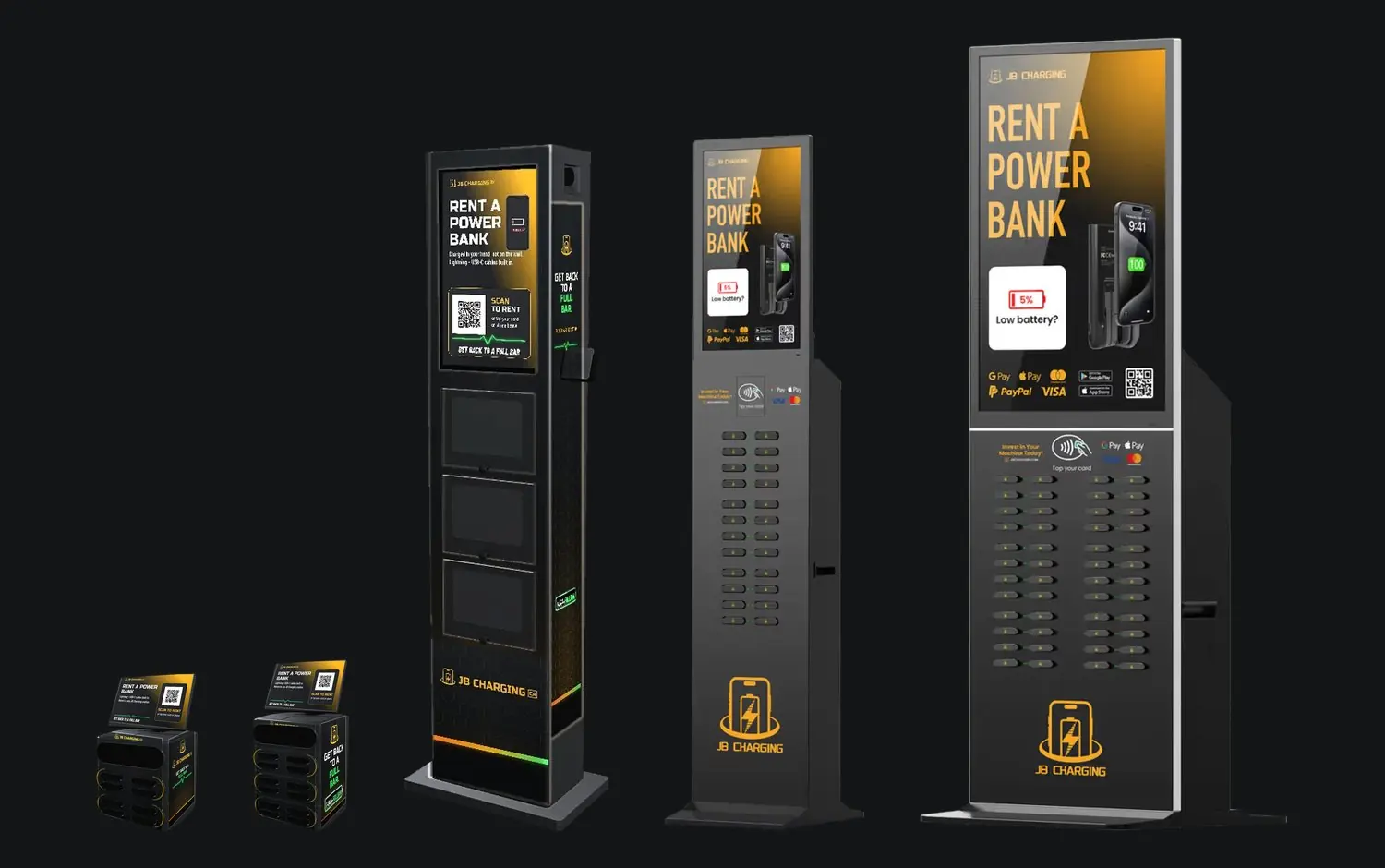
04Creative specs
Draft specs, confirmed in your proposal. We check every file and send a proof before anything goes live.
| Item | Portrait screens | Landscape screens |
|---|---|---|
| Stations | J24 Pro, J24 Pro Outdoor, J48 Pro | J8 Pro, J12 Pro, J8 Pro on floor stand |
| Artwork size | 1080 × 1920 px (9:16) | 1280 × 800 px (16:10) |
| Images | JPG or PNG, RGB, under 5 MB | |
| Video | MP4 (H.264), up to 15 seconds, no sound needed (screens play muted), under 50 MB | |
| Safe area | Keep text and logos 5% in from every edge; the bottom 4% may show the loop progress bar | |
| QR codes | At least 15% of the screen width, dark on a light background, with a short call to action | |
| Station wraps | Print-ready vector or 150 dpi at full size; a template for each station model | |
05How a campaign runs
06Plans
07Contact
Tell us who you want to reach. We reply within one business day with matching venues, availability and a proposal.
NetworkNational rollout · launching
JB has agreed to let JB Charge Ads run national advertising on JB Charging machines. Today the network is live across six Southern California regions. National is the rollout, and we will only show market figures once they are live.
RolloutHonestly staged
Los Angeles, Orange County, San Diego, the Inland Empire, Ventura and Santa Barbara, and the Coachella Valley. Book now with the published plans.
Build a campaignNational ads on JB Charging machines in new markets, sold through the same plans, proofs and monthly summaries.
Join the listOne brief, one proof and one campaign across every JB screen that suits your brand, by venue type and market.
Details to be confirmedCoverage today
Station locations grow as new venues join, so we confirm the exact screens in each proposal.
NewSee it in the wild
Your creative, fitted in perspective onto the station screen in 15 venue scenes. Swipe through, then download a postcard of any of them. Design yours in the studio.
NewWhat you'd see
A concept of the campaign view: QR scans by venue, by hour and by week, your top screens and a creative A/B. Every figure on this page is sample data for a fictional business.
SpotlightsSample case studies
Four fictional advertisers, start to finish: the challenge, the setup, the creative they ran, where and when it played, and sample results with charts. Built from the published plans and specs; every number is illustrative.
AdvertiseStart an inquiry
We check which screens are available in the areas and venues you chose, and reply with a short proposal.
LegalPrivacy policy
Effective November 4, 2026
JB Charge Ads sells and runs advertising on the screens and stations of the JB Charging network. This policy explains how we handle information sent through this website.
Our inquiry, proposal, design and market-notification forms ask for your name, business, email, phone number and details about the campaign you have in mind. We use it to reply to you, prepare a proposal and run any campaign you book. We do not sell it.
Form submissions are stored in this website’s database and customer records, hosted with WP Engine, and sent to our team by email. We keep them while we are working with you and for our business records afterwards.
The campaign builder and ad studio run in your browser. Drafts you make there are kept in your own browser storage and are not sent to us unless you submit a form.
We email you about your inquiry and your campaigns. If you also ask to hear about new screens and markets, you can unsubscribe at any time using the link in any message.
This website uses only the cookies needed to run it. If we add analytics, we will update this policy first.
To see, correct or delete the information you sent us, call 1-844-385-5227 or reply to any email from us.
We may update this policy. The effective date above shows when it last changed.
LegalTerms of use
Effective November 4, 2026
This website describes advertising on JB Charging station screens and lets you build a draft campaign, design a draft ad and ask for a proposal. By using it you agree to these terms.
Prices and estimates on this website are a guide. Your plan, price, screens, venues and dates are set in your written proposal and order, which control if anything differs.
The businesses shown in sample ads, wraps, spotlights and results on this website are fictional, results views use sample data, and some venue scenes are AI-generated, to show how ads look on the stations.
Advertisers are responsible for the content of their ads and their right to use it. We may decline or remove any ad that does not suit a venue, its guests or our guidelines.
This website is provided as is. To the extent the law allows, we are not liable for indirect losses from using it.
Questions about these terms: call 1-844-385-5227.
404Battery at 0%
It may have moved when we rebuilt the site. Try one of these instead.